Chef is a powerful suite of tools and applications that can minimize manual management of your virtual machines’ software and configuration. It has a wide variety of configuration options for many platforms that can be handled using Chef Infra and its client component.
Managing Software Deployments
The Chef Infra Client is essential for managing software deployments. In the picture below, the client serves as the configuration tool installed on all the VMs (or “nodes”) and is responsible for managing and installing software on that particular node.
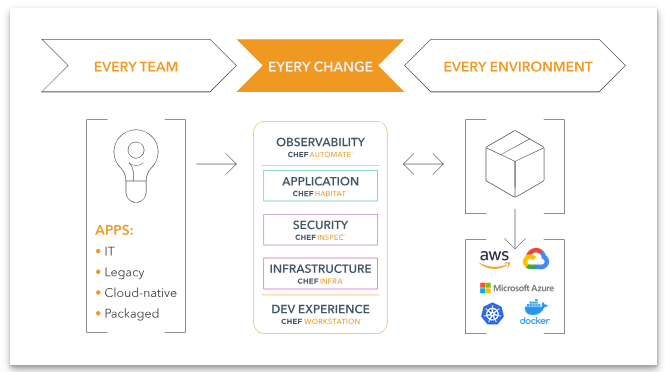
( Source https://docs.chef.io/platform_overview/)
It can be confusing sorting through the various options and capabilities, so here is a quick how-to on getting started with the Chef Infra Client on a virtual machine.
Getting Started with Chef Inra Server
Getting started is as easy as downloading the latest release from the Chef website, where they offer packages for a variety of platforms. Choose the package that makes sense for your hardware and install the client. You can configure the client by editing its client.rb file, which offers options for security, networking, run time configuration, and more. (The full list is at https://docs.chef.io/config_rb_client/.)
The chef client can be used in local mode to test cookbooks or in a single server setup, or it can be connected with a Chef Infra Server, a tool that can be used to centrally manage many clients on different VMs. It uses cookbooks to act as infrastructure as code and dictate the state of the system. When run in local mode, the client will run cookbooks that are stored on the server. The directory path for where these are stored can be configured in the client.rb file.
Running Cookbooks from the Chef Infra Server
When running cookbooks from the Infra Server, the Chef Client retrieves the latest cookbooks from the Chef Infra Server and runs them against the target VM. The Chef Infra Server acts as a central hub for clients to connect to. It serves as a centralized location for cookbooks to be uploaded and updated regularly, as well as providing configuration instructions for connected clients and auditing capabilities. The server can be configured to track all changes made and servers connected, which can be viewed and managed through console windows.
Chef clients are essential components for managing Chef installed software and configuration. When integrated with Chef Infra Server, it has the ability to run on a regular schedule and update the system as needed, pulling information and the latest updates from the server, reducing the need for manual updates on every server. It’s a useful tool for those looking to start bootstrapping their nodes. Checkout their website and documentation for more information on how to start using Chef at https://www.chef.io/.
