SharePoint Property Bag allows to store configurations settings at different levels of the SharePoint hierarchy outside of the application itself. Property bag is basically a hash table of key-value pair options. Property bag feature is available in Windows SharePoint services 3.0, SharePoint 2010 and SharePoint 2013. Property bag helps you to store meta data as key-value pairs example Connection Strings, file paths, server names and other settings in SharePoint application. This is something like app.config information in classic ASP.NET. Property bags can be created / Modified / Deleted from Sharepoint designer, using Object model or using http://pbs2010.codeplex.com/ access Property bags from Central Administration.
Advantages of using Property bag element
1. The SharePoint Property Bag Settings includes a hierarchical configuration manager that can safely store and retrieve configuration settings at the following levels:
*Farm (SPFarm class)
*Web application (SPWebApplication class)
*Site collection (SPSite class)
*Site (SPWeb class)
*List (SPList class)
2. Import and Export Property bags
3. Access Property bags from Central Administration or Site Settings
4. Encrypting property bag value
Using SharePoint designer :
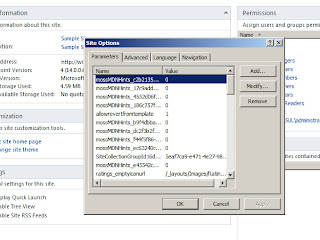
You can use SharePoint designer for getting the Property bag settings.
1. Open a site in SharePoint Designer
2. Go to Site menu click on Site options
3. Site Settings dialog box opens
4. Click on Parameters tab where you can see the list of existing properties
from the same place you can even perform add/modify/delete operations.
Using Central Admin :
There is no out of the box user interface available for setting and reading the property bag values, however you can download this Property Bag util from http://pbs2010.codeplex.com/releases/view/46201 to have the interface in central admin for setting the property bag values. This SharePoint Property Bag Settings is a reusable component that you can include in your own SharePoint applications. It can store simple types, such as integers or strings, as well as any type that can be serialized to XML.
Using SharePoint object model :
|
1
2
3
4
5
6
7
8
9
10
11
12
13
14
15
16
17
18
19
20
21
22
23
|
using (SPSite RootSite = new SPSite(URL)) { using (SPWeb web= RootSite.OpenWeb()) { try { web.AllowUnsafeUpdates = true; // Get Property bag if (web.AllProperties.ContainsKey("SiteID")) { var data = web.AllProperties["SiteID"].ToString(); } // Set Property bag web.Properties["SiteID"] = "GUID"; web.Properties.Update(); web.AllowUnsafeUpdates = false; } catch (Exception ex) { //Throw Exception } } } |
